04: Browser security basics: messages are data, not code
Use a supplied local message board to see how a browser displays messages. First post ordinary text, then watch a harmless demo change a marker. Follow a guided code repair so messages stay text, and check the result.
Time: approximately 75–90 minutes.
Prerequisites: opening files in a desktop browser and saving a file in a plain-text code editor. The worksheet introduces the HTML and JavaScript needed for the guided repair. No terminal, Node, npm, server, internet connection, or CVE Lite installation is required for students.
Start here
- Extract the downloaded repository and open this exercise folder.
- Open
student/index.htmlin a desktop browser. - Open
student/render.jsin a plain-text code editor. - Read Safety, then follow the worksheet in order. Record your work in the submission template.
If you received a student-only kit, open app/index.html and edit app/render.js instead. Use the same copy throughout. Keep all app files together.
The starter is deliberately unsafe: expect 3/6 browser checks to pass before repair and 6/6 afterward. The worksheet supplies a complete replacement-file scaffold with one guided blank. Save the edited file, then reload the browser to apply it. Reload and Reset board restore the two example messages and remove messages you added.
Learning outcomes
- Post and read messages using the supplied controls.
- Observe the harmless demo's marker change.
- Explain the difference between displaying text and interpreting HTML.
- Complete a guided repair using
textContent. - Repeat the demo and checks, and report actual results.
No backend knowledge or reading of data.js or app.js is required. More experienced JavaScript students may choose the worksheet's independent repair challenge. It is optional and not needed for full credit.
Teaching package
- Worksheet and submission template.
- Teaching plan, walkthrough, and 100-point rubric.
- Worked solution, with a standalone corrected app.
From the repository root, instructors with Node can export a student-only kit:
node tooling/package-student-kit.mjs 04-browser-security-basics browser ./dist/browser-security
The destination must not exist. Distribute the generated folder when withholding instructor materials and the worked solution. It includes the intentionally guided scaffold and hints. Students do not need Node. The full solution remains publicly accessible in this repository; the export is not an examination-security mechanism.
Troubleshooting
If HTML source appears, open index.html in the browser rather than the editor. If buttons do nothing, extract all files and keep them together. After a repair, check that the complete scaffold was copied, the blank was filled, and the file is named render.js, not render.js.txt. Save and reload the matching browser copy. Ask the instructor for help with any remaining error; never disable browser security.
Optional context for instructors
This is one cross-site scripting (XSS) example within OWASP Top 10:2025 A05 Injection, not complete coverage of that category. These public category references do not imply institutional endorsement.
CVE Lite scans dependencies for known vulnerabilities; it does not detect this intentional flaw in the app's own code. Students do not need to run a scanner here.
Author and reader are views in one local tab, with messages held in memory. There are no accounts, server, database, or real cross-user delivery. The board requires plain text, which is why textContent fits this repair. Backend controls and other output contexts belong to later lessons. The worksheet's technical extension is optional and ungraded.
What the exercise looks like
Starting point
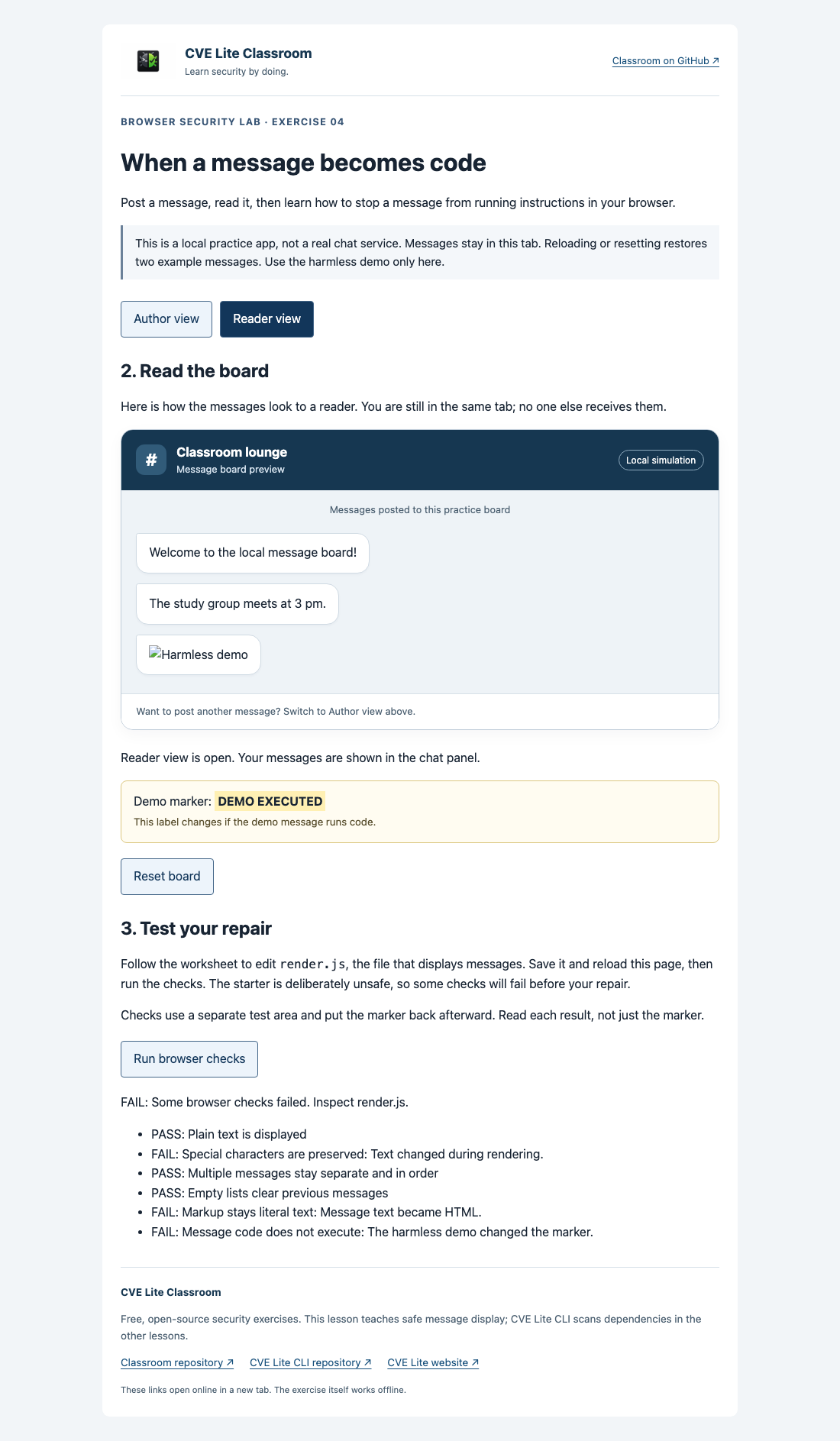
Unsafe starter reader view after the demo message, with failing security checks.
Expected result
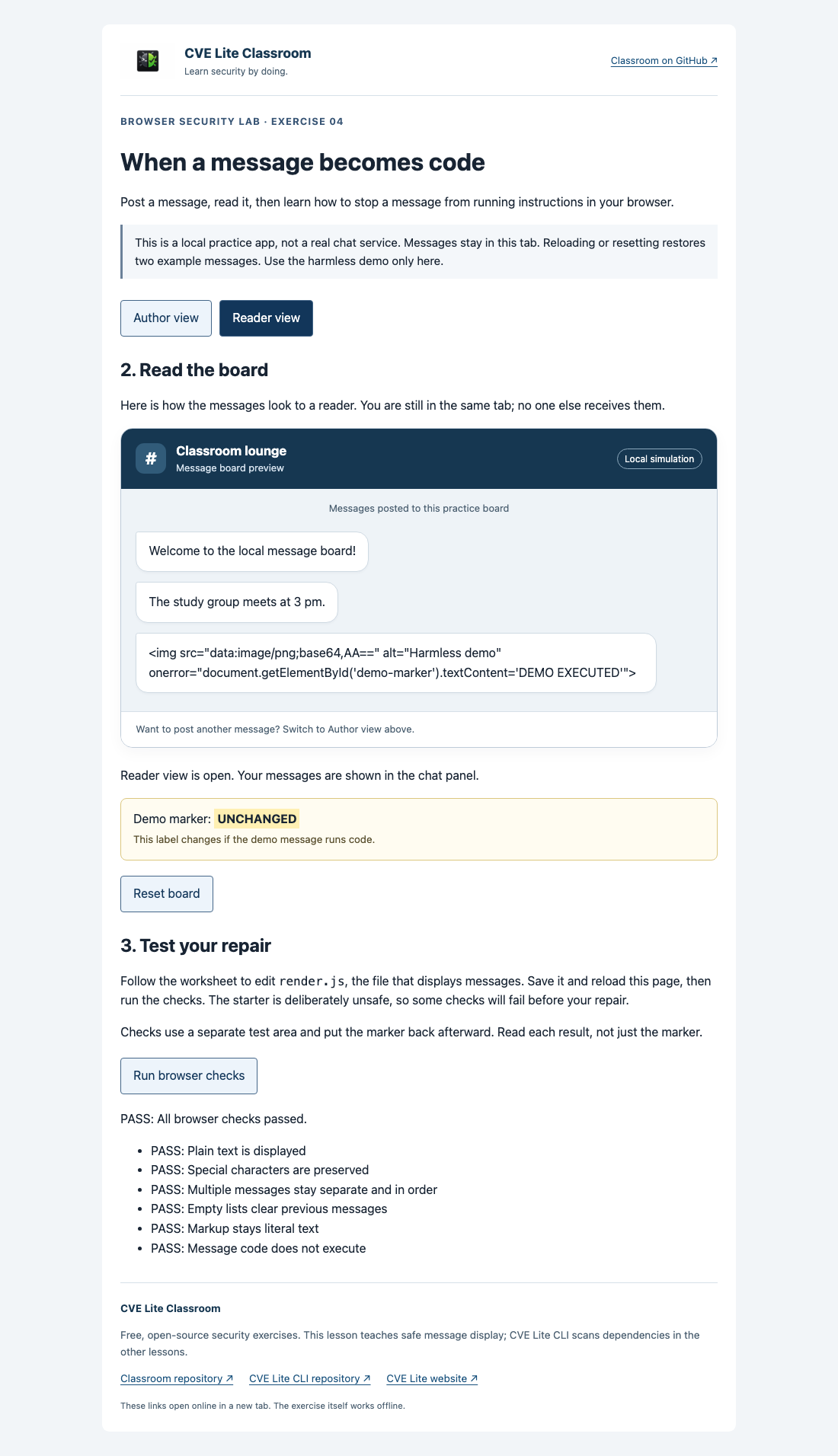
Repaired reader view treats message markup as text and passes all six checks.
See screenshot sources and context. Use your own run as submission evidence.