05: Broken Access Control: Whose record is this?
CVE Lite Classroom · Exercise catalog
A record number tells a server which record you want, not whether you may read it. In this lesson you use a supplied student portal, find an unsafe permission decision, and repair one small function. All records are fictional.
Allow about 75–90 minutes after setup. No prior server programming is expected. You need a desktop browser, a plain-text code editor and Node.js 22 or newer. There is no package installation, framework, database or account setup.
Start as a student
-
Download and extract the repository. Do not run inside a ZIP file.
-
Open this exercise's
studentfolder in your code editor. It containsserver.mjsandauthorize.mjs. -
Open the editor's integrated terminal in that folder. A terminal is a window where you type commands and press Enter. In VS Code use Terminal → New Terminal after opening the
studentfolder. -
Run
node --version. You need version 22 or newer. If Node is missing, ask your instructor for the approved installation method before class. -
Run:
node server.mjs -
Leave the terminal running. Open http://127.0.0.1:3000 in your browser. Do not double-click
index.htmlfor this lesson: the browser needs the local server. -
Read safety, then work through the worksheet. Edit only
student/authorize.mjs.
If your terminal is already at the repository root instead, first run cd exercises/05-broken-access-control/student, then the commands above. The server terminal stays occupied until you press Ctrl+C. That is normal.
What you receive
- A fictional portal with a fixed demonstration identity: Alex, student-1.
- A request panel where you choose a record ID and see the response.
- A guided JavaScript repair and submission template.
- Automated checks: from the
studentfolder runnode checks.mjsafter stopping the server. Some checks intentionally fail before repair; all should pass afterward.
For instructors
Use the teaching plan, walkthrough, rubric and worked solution. The solution is public; distribute a student-only kit if withholding it until the debrief.
From the repository root, export a new kit directory:
node tooling/package-student-kit.mjs 05-broken-access-control node ./dist/access-control
Distribute the entire output folder. Students open its README.md, start the server from its app folder and follow its worksheet. No other repository files are required.
Learning boundary
This demonstrates record ownership within OWASP Top 10:2025 A01: Broken Access Control. It does not cover every access-control risk. The server supplies a fixed fictional identity so students can focus on authorization; this is not a production login system. CVE Lite CLI scans dependency vulnerabilities in other lessons; it does not detect this code-level authorization flaw.
What the exercise looks like
Starting point
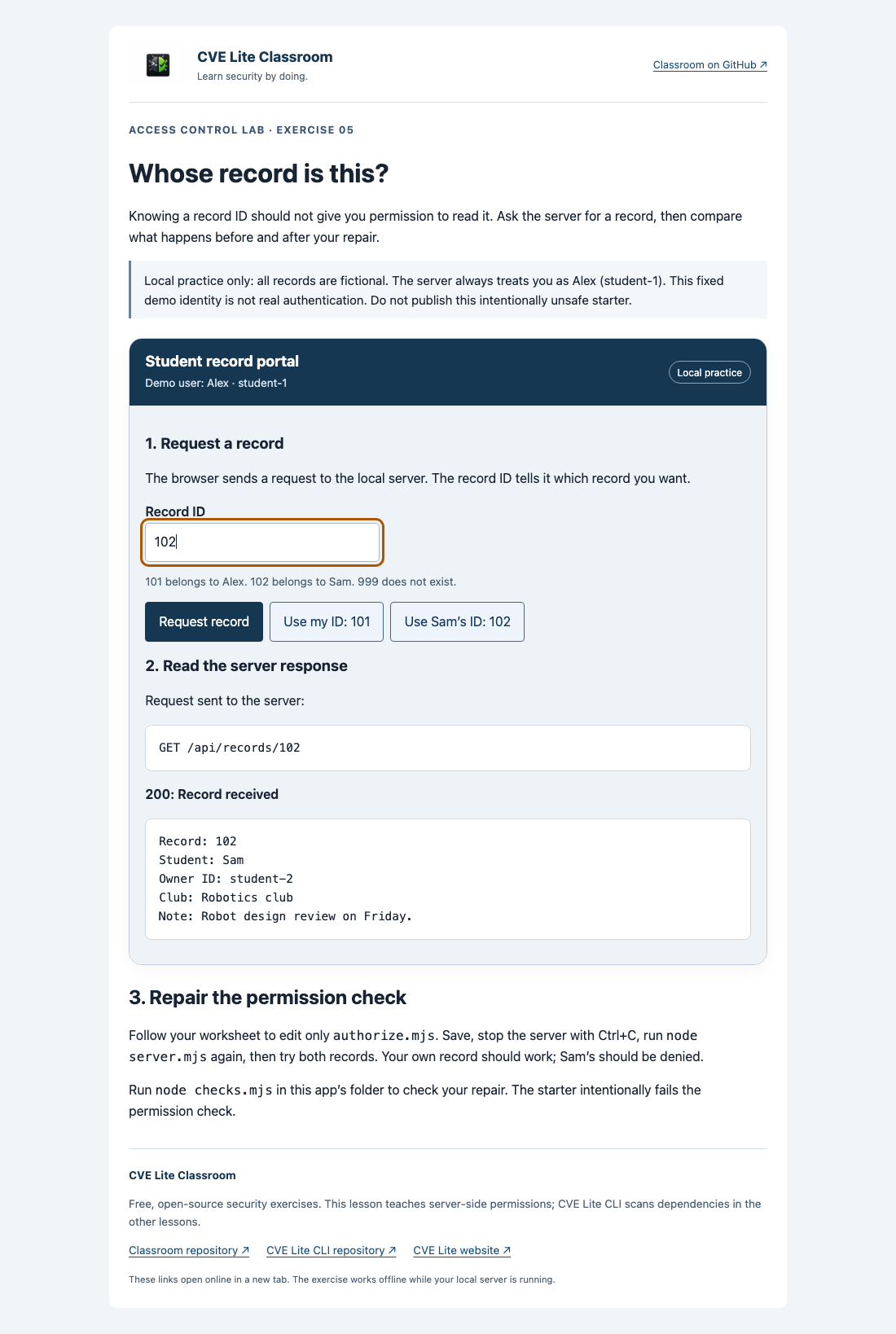
Starter returns another student’s record with HTTP 200.
Expected result
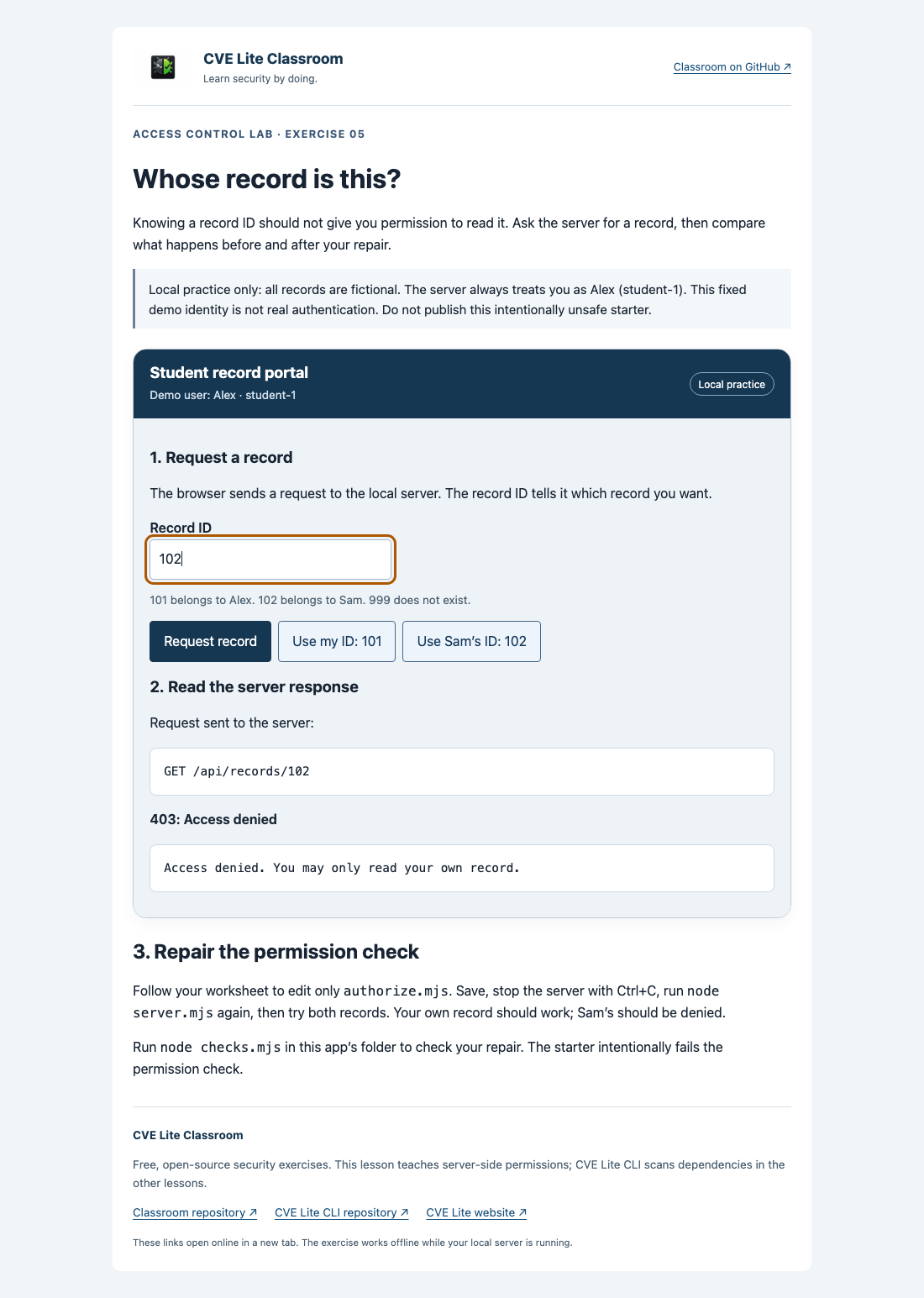
Repaired app denies that same request with HTTP 403 and does not disclose the record.
See screenshot sources and context. Use your own run as submission evidence.