06: Security Misconfiguration: What did the error reveal?
CVE Lite Classroom · Exercise catalog
A useful debugging message can reveal too much when it is sent to every visitor. Use the supplied campus service-status app, trigger a simulated failure, and repair one configuration setting. All internal details in this lab are fictional.
Allow 60–75 minutes after setup. You need a desktop browser, plain-text editor and Node.js 22 or newer. No prior server programming is expected. No package installation, database or account is required. Exercise 05 is helpful but not required.
Start as a student
- Download and extract the repository; do not work inside a ZIP file.
- Open
exercises/06-security-misconfiguration/studentin your editor. - Open the editor's terminal in that folder (VS Code: Terminal → New Terminal). A terminal is where you type a command and press Enter.
- Run
node --version. You need 22 or newer. If missing, ask your instructor for the approved installation method before class. - Run
node server.mjs. Leave this terminal running. - Open http://127.0.0.1:3000 in the browser. Do not double-click
index.html; this lesson needs its local server. - Read safety, then follow the worksheet. Edit only
student/config.mjs.
If your terminal is at the repository root, first run:
cd exercises/06-security-misconfiguration/student
node server.mjs
The terminal stays occupied while the server runs. Stop it with Ctrl+C. After changing configuration, save, stop and restart: refreshing the browser alone does not reload the server's configuration.
What you receive
- A working-status request and a controlled failure request.
- An actual server response displayed as JSON, with fictional diagnostics in the unsafe starter.
- One boolean setting to repair and a submission template.
- Direct HTTP checks: stop the server, then run
node checks.mjsfrom the same student folder. The starter intentionally fails the disclosure check; the repaired app should pass all checks.
For instructors
Use the teaching plan, walkthrough, 20-point rubric and worked solution.
From the repository root, export a new student-only kit:
node tooling/package-student-kit.mjs 06-security-misconfiguration node ./dist/misconfiguration
Choose a new destination if that folder already exists. Distribute the entire output folder; its README points students to app. Solutions are public in the repository but excluded from the kit.
Learning boundary
This is a focused example of OWASP Top 10:2025 A02: Security Misconfiguration. It is not complete production hardening. CVE Lite CLI scans dependency vulnerabilities in other lessons; it does not detect this debug-setting flaw.
What the exercise looks like
Starting point
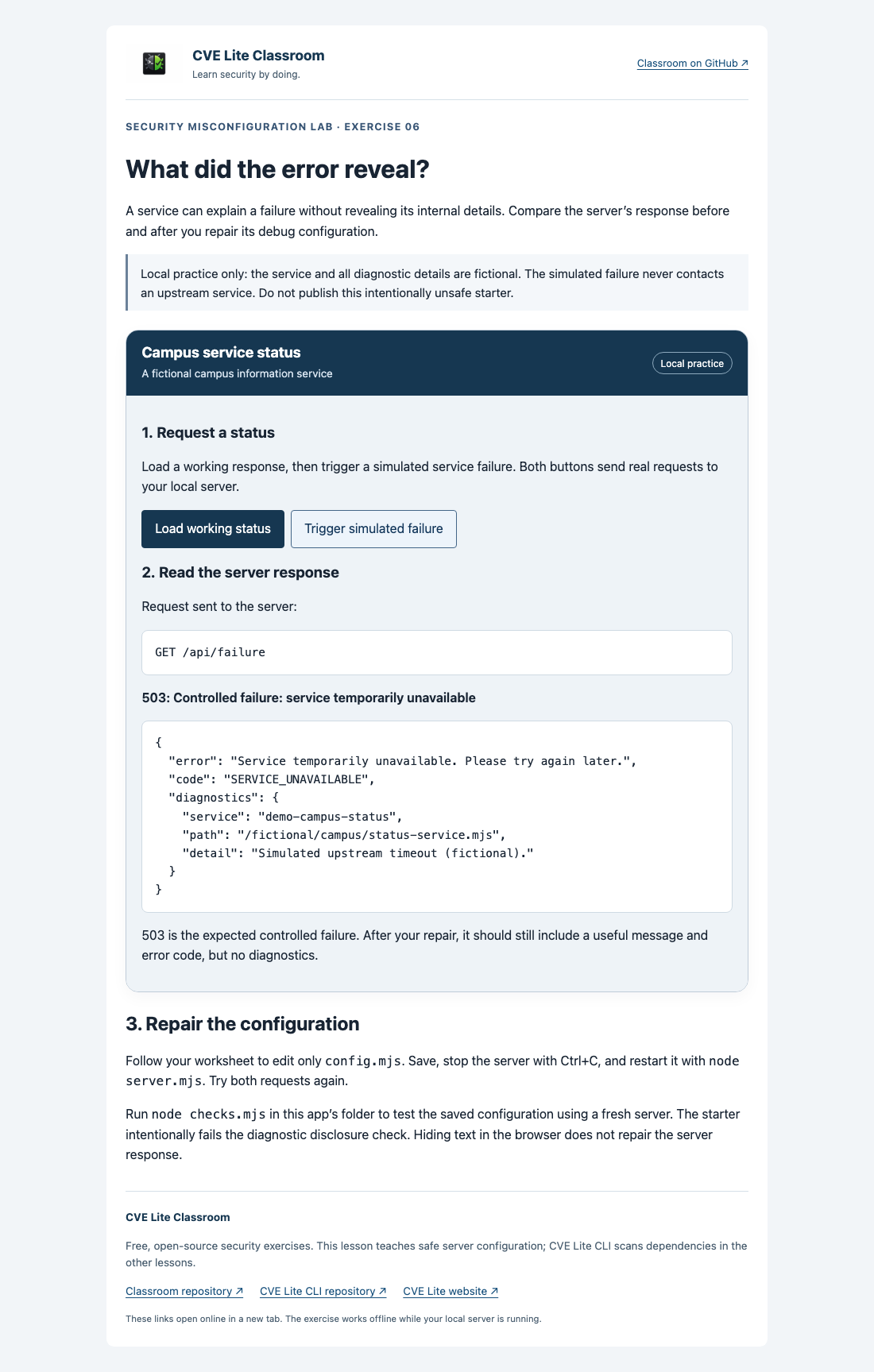
Starter failure response includes fictional internal diagnostic details.
Expected result
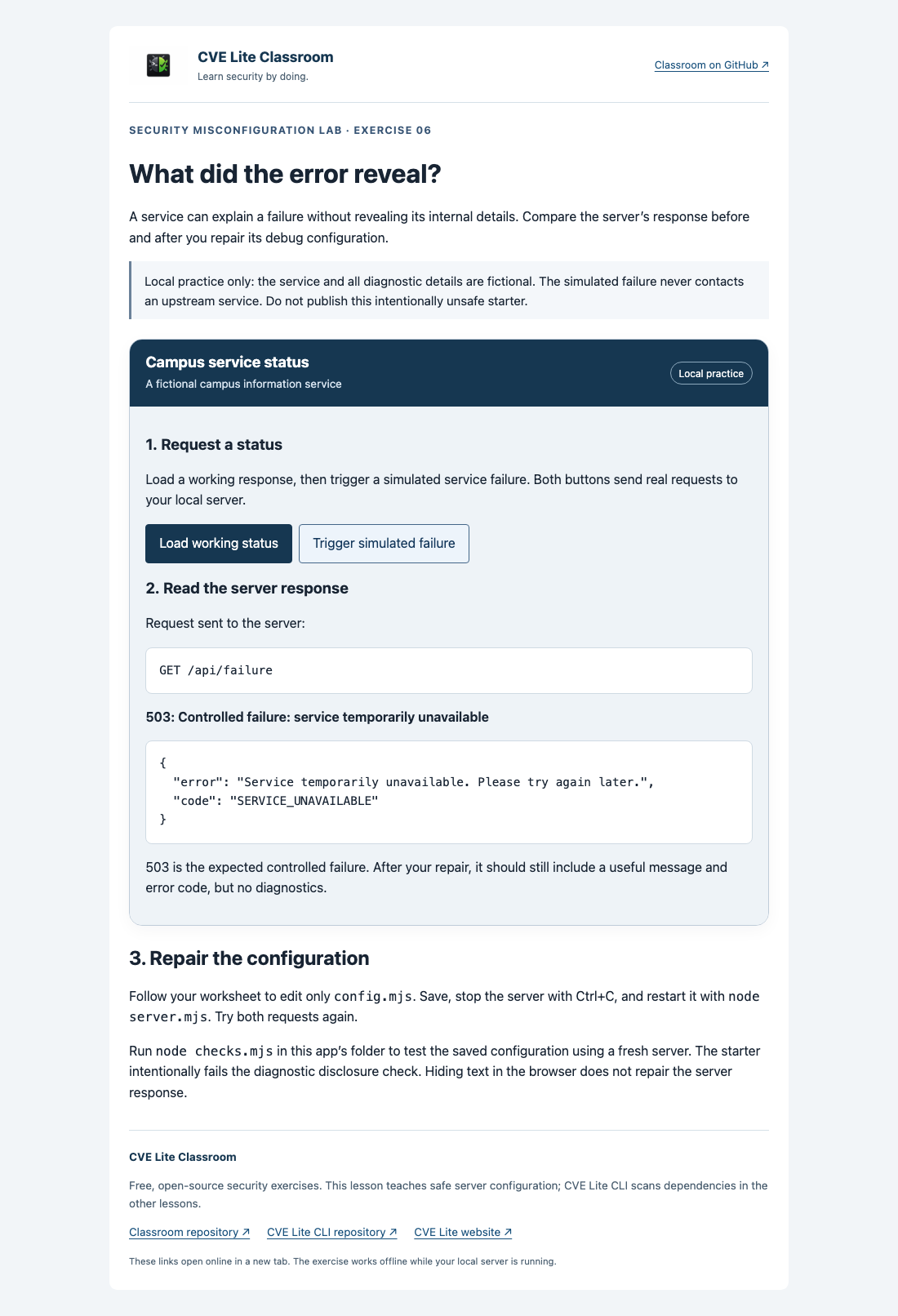
Repaired failure response preserves HTTP 503 and a useful public message without diagnostics.
See screenshot sources and context. Use your own run as submission evidence.