Guided exercise
Insecure Design
Each step brings together the instructions, examples and evidence you need. Move freely using Next, Previous or the step list.
Before you start
The lesson at a glance
CVE Lite Classroom · Exercise catalog
Use the supplied campus-account app to discover why knowing an email address is not proof of ownership. Improve the recovery design, connect a supplied verification helper, and test legitimate and unauthorized password changes.
Allow 75–90 minutes after setup. You need a desktop browser, a text editor and Node.js 22 or newer. No earlier exercise, server-programming experience, package installation, database, real email account or internet connection is needed after download.
What the exercise looks like
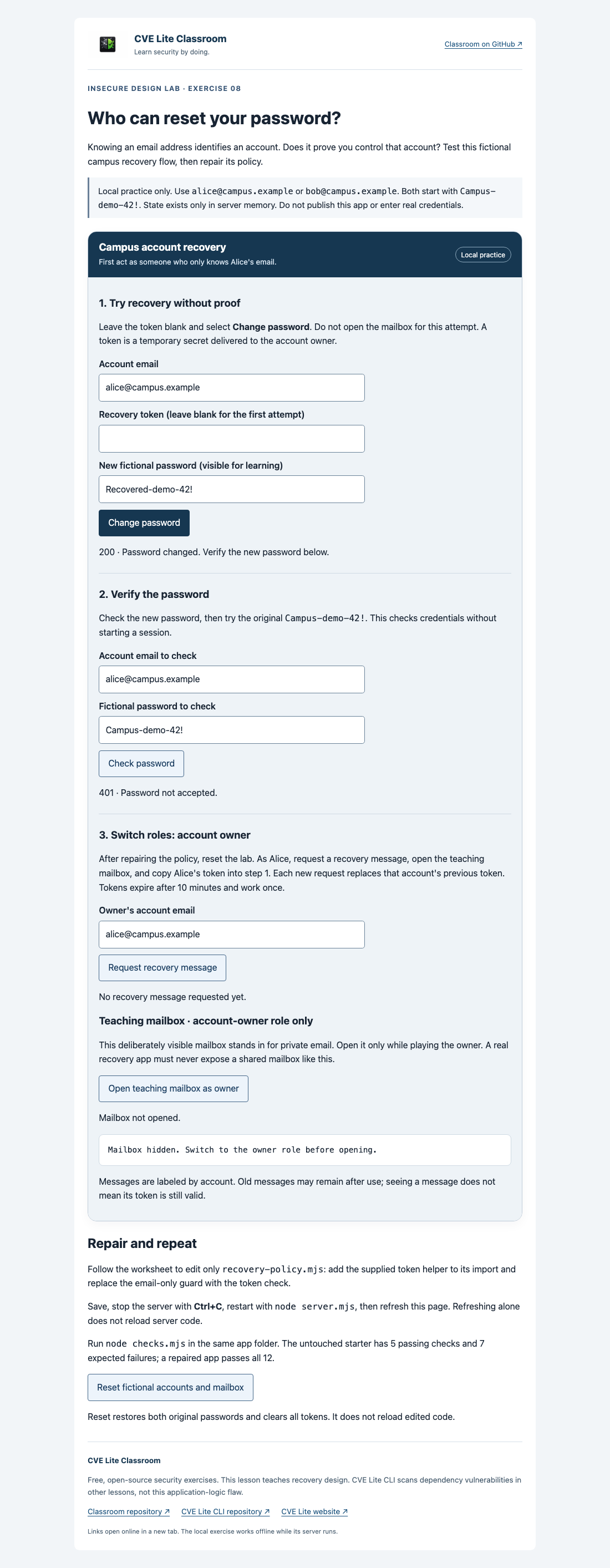
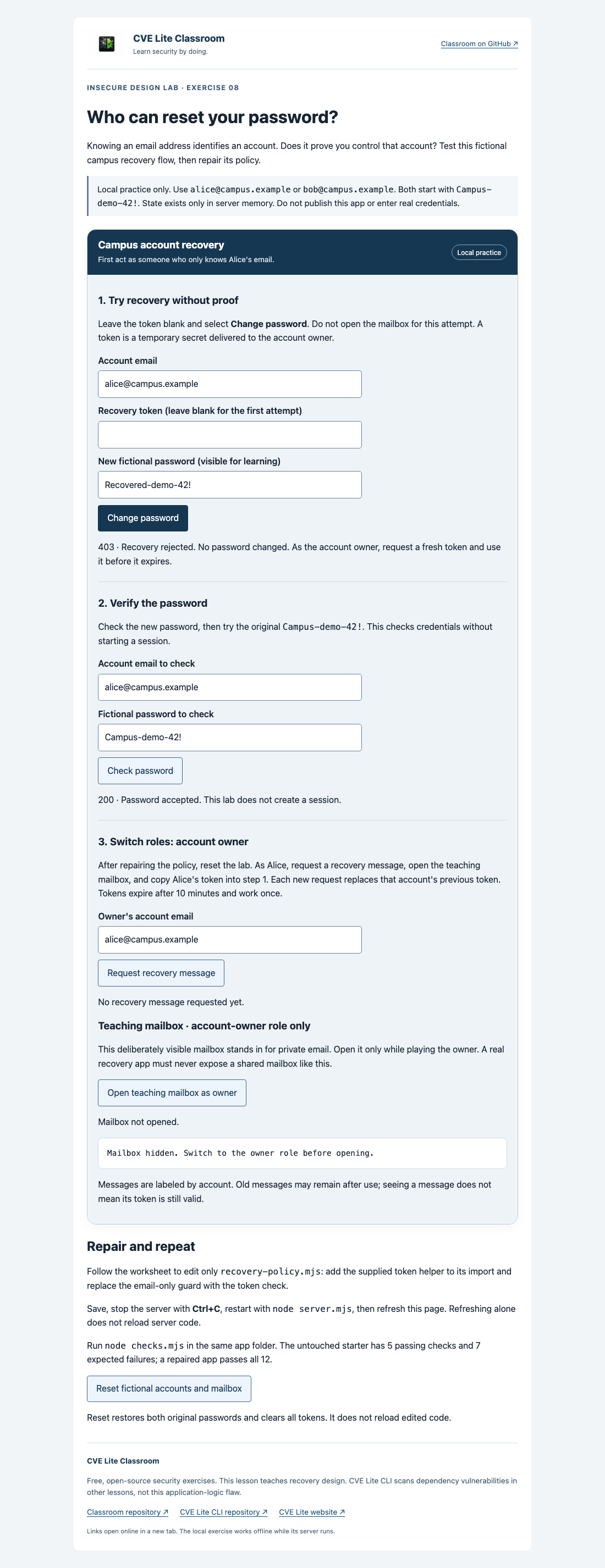
Original lesson screenshots. You’ll revisit these beside the relevant instructions.
Safety and scope
- Use only this supplied app on 127.0.0.1 and the fictional
campus.exampleaccounts. Do not test real recovery pages or enter university credentials. - Keep the server local. Do not change the binding, deploy it publicly, use a tunnel or connect it to real email. The starter intentionally permits unauthorized password changes.
- The teaching mailbox is deliberately visible to the learner playing the owner. It is not an access-controlled mailbox or a production design. A real recovery channel must remain private to its owner.
- Use the given fictional passwords. Account state and tokens are temporary and reset when the server restarts or the lab is reset.
- Do not publish real passwords or tokens. Lab screenshots may show only the disposable fictional values generated here.
- The worked repair demonstrates proof-of-control checks, not complete protection of a production identity system. Real systems also need protected delivery, abuse controls, session handling and recovery notifications.
- Edit only
recovery-policy.mjsduring the student task. Leave token generation, password hashing and checks unchanged. - When finished, stop the server with Ctrl+C. No external scanning or network service is needed.
What you will learn and verify
What you receive
A complete local recovery app, fictional accounts, a teaching-only mailbox, a small policy repair, submission template and twelve checks. The starter passes five and intentionally fails seven proof-of-control checks; the worked repair passes all twelve. The mailbox stands in for an owner's private email channel, not a publicly accessible production mailbox.
Learning boundary
A focused example of OWASP A06:2025 Insecure Design: define a missing security requirement before implementing it. The repair uses account-bound, expiring, single-use tokens. It does not build a full email-delivery, authentication or session-management service. See OWASP's recovery guidance for broader considerations.
CVE Lite CLI detects known dependency vulnerabilities in other lessons. It does not identify this application's missing proof-of-control requirement.
Your mission
The campus app lets a person who forgot a password recover their account. That is useful. But how should it distinguish the owner from someone who only knows the owner's email address?
You will observe the unsafe design, write a better requirement, connect a supplied helper, and prove the repaired flow still works. Read safety. Allow 75–90 minutes after setup.
In the wild: real-world case study
Account recovery and password reset bypasses (2019)
- Incident & Year: Instagram Password Reset Vulnerability (2019)
- Vulnerability: No CVE assigned (Disclosed via Bug Bounty Program) · CWE-640 (Weak Password Recovery Mechanism for Forgotten Password) · OWASP A06:2025 Insecure Design
- Root Cause: Instagram's mobile account recovery flow issued six-digit verification codes sent via SMS. Although per-IP rate limiting existed, the endpoint lacked global rate limiting across the token space. A security researcher demonstrated that sending 200,000 concurrent race-condition requests across rotating cloud IP addresses within the ten-minute window allowed guessing the passcode and triggering an unauthorized reset.
- Real-World Impact: The vulnerability allowed an unauthenticated attacker to take over any Instagram user account in under ten minutes without access to the victim's phone or email. Meta awarded a $30,000 bug bounty reward for the responsible disclosure prior to malicious exploitation.
- Remediation Tie-In: Exercise 08 highlights the principle of secure design: ensuring password reset mechanisms mandate strong proof of ownership using high-entropy random tokens, single-use invalidation, strict rate limiting, and safe fallback states that leave original credentials intact until verification succeeds.
- References: Laxman Muthiyah Account Takeover Writeup · OWASP Forgot Password Cheat Sheet · CWE-640 Definition
If something goes wrong
| Symptom | Action |
|---|---|
| Node missing or older than 22 | Ask your instructor for the approved installation method. |
| Cannot find server.mjs | Open the terminal in the app folder, not the repository root or ZIP. |
| Another lesson appears or port 3000 is in use | Stop that lesson's server with Ctrl+C before starting this one. |
| Cannot reach the local app | Start the server, read any terminal error, and refresh. |
| Code change has no effect | Save, stop, restart, refresh. Refresh alone does not reload server code. |
| Token rejected after restart/reset | Expected: old tokens are invalid. Request a fresh token. |
| A new request makes the previous token fail | Expected: use the latest token for that account. |
| Owner recovery fails | Check the account, copy the full latest token, and ensure it has not been used or expired. |
| SyntaxError or helper not defined | Check the import, comma, spelling, parentheses and semicolons against section 4. |
| Some checks fail | Read their names; compare the guard and import with the helper table. Do not edit helpers/tests. |
| Need to repeat an observation | Use the lab reset control or restart. Both restore initial passwords and clear tokens. Save evidence first. |
Lesson references
Return to examples, teaching notes or the worked solution when you need them.
Screenshot sources and context
These images are captured from the supplied local application, not mockups or generated illustrations. They show fictional accounts only. Use them for orientation and collect your own evidence for submission.
| File | What it shows |
|---|---|
starting-point.png | The unmodified starter accepts a password reset without a verification token. |
expected-result.png | The repaired app rejects an empty-token reset and accepts the unchanged initial password. |
Reproduce using node server.mjs in the app folder and follow the worksheet. In an exported student kit this is app; make the worksheet repair there to observe the expected result. In the full repository, separate student and solution folders supply the two versions.
For maintainers with the full repository, run node tooling/recovery-browser-smoke.mjs from its root. It tests the browser flow and saves review captures under dist/recovery-preview; copy the reviewed desktop captures into this screenshots directory when updating the lesson. Maintainer tooling and the reference solution are not part of the student kit.
Tokens and timestamps vary between runs. Compare behavior rather than exact values. The teaching mailbox is an owner-role demo, not a public production endpoint. No real messages are sent.
Worked solution — compare after your attempt
Worked reference: attempt the worksheet first, then compare your reasoning and results.
Worked solution: account-recovery design
Attempt the student worksheet before reading this reference. The application files in this folder are a complete runnable solution. Run node server.mjs from this folder, or node checks.mjs to verify the repair. Stop other lesson servers first.
Revised design
An account's email identifies where recovery is requested; it does not prove control. The owner receives an unpredictable temporary token through a private channel. The server accepts a password change only after verifying that the token belongs to this account, has not expired and has not already been used. Rejected proof leaves the password unchanged.
The local teaching mailbox represents that channel for demonstration. In production it must not be public. Requesting a replacement token invalidates the prior token in this lab, and successful recovery invalidates outstanding tokens for the account.
Policy repair
import { consumeRecoveryToken, setAccountPassword } from './recovery-helpers.mjs';

export function completeRecovery(state, { email, token, password }) {
  if (!consumeRecoveryToken(state, email, token)) return false;
  return setAccountPassword(state, email, password);
}
The helper performs verification and consumption before the update. The surrounding server validates input before calling this policy. The starter only checked state.accounts.has(email), allowing an unauthorized requester who knew an existing email to choose a new password.
The token helper and password-storage implementation are supplied, not student-created cryptography. Only recovery-policy.mjs differs between the student and solution application files.
Expected observations
- Missing, wrong, expired, cross-account, superseded and reused tokens do not authorize a change.
- An invalid attempt does not consume a valid token belonging to another account.
- The owner's latest valid token authorizes one change; the new password then works and the old one fails.
- The normal request acknowledgement does not disclose a token or whether the account exists.
- All supplied checks pass. Expiry is tested with controlled time rather than a ten-minute wait.
This repair is a focused design lesson. A complete service also needs private delivery, HTTPS, abuse controls, consistent response timing, recovery notifications and session policies. This app creates no authenticated sessions. Do not deploy it or use real credentials.
For instructors
Use the teaching plan, walkthrough, 20-point rubric and worked solution.
Export a student-only kit from the repository root, choosing a new destination:
node tooling/package-student-kit.mjs 08-insecure-design node ./dist/account-recovery
Distribute the entire output folder. It excludes instructor materials and solutions. The public repository still contains the worked answer. Versioned download ZIPs are published separately; local export does not require a release.
In the wild: real-world case study
Account recovery and password reset bypasses (2019)
- Incident & Year: Instagram Password Reset Vulnerability (2019)
- Vulnerability: No CVE assigned (Disclosed via Bug Bounty Program) · CWE-640 (Weak Password Recovery Mechanism for Forgotten Password) · OWASP A06:2025 Insecure Design
- Root Cause: Instagram's mobile account recovery flow issued six-digit verification codes sent via SMS. Although per-IP rate limiting existed, the endpoint lacked global rate limiting across the token space. A security researcher demonstrated that sending 200,000 concurrent race-condition requests across rotating cloud IP addresses within the ten-minute window allowed guessing the passcode and triggering an unauthorized reset.
- Real-World Impact: The vulnerability allowed an unauthenticated attacker to take over any Instagram user account in under ten minutes without access to the victim's phone or email. Meta awarded a $30,000 bug bounty reward for the responsible disclosure prior to malicious exploitation.
- Remediation Tie-In: Exercise 08 highlights the principle of secure design: ensuring password reset mechanisms mandate strong proof of ownership using high-entropy random tokens, single-use invalidation, strict rate limiting, and safe fallback states that leave original credentials intact until verification succeeds.
- References: Laxman Muthiyah Account Takeover Writeup · OWASP Forgot Password Cheat Sheet · CWE-640 Definition