Guided exercise
Authentication Failures
Each step brings together the instructions, examples and evidence you need. Move freely using Next, Previous or the step list.
Before you start
The lesson at a glance
CVE Lite Classroom · Exercise catalog
Use a supplied campus portal to discover why a signed-out screen is not proof that a session has ended. Capture a fictional session token, log out, and replay it against the server. Repair one small server policy so that logout actually revokes access.
Allow 75–90 minutes after setup. You need a desktop browser, a text editor and Node.js 22 or newer. No earlier exercise, package installation, database, real account or internet connection is needed after download. The worksheet introduces the session concepts and JavaScript required for the repair.
What the exercise looks like
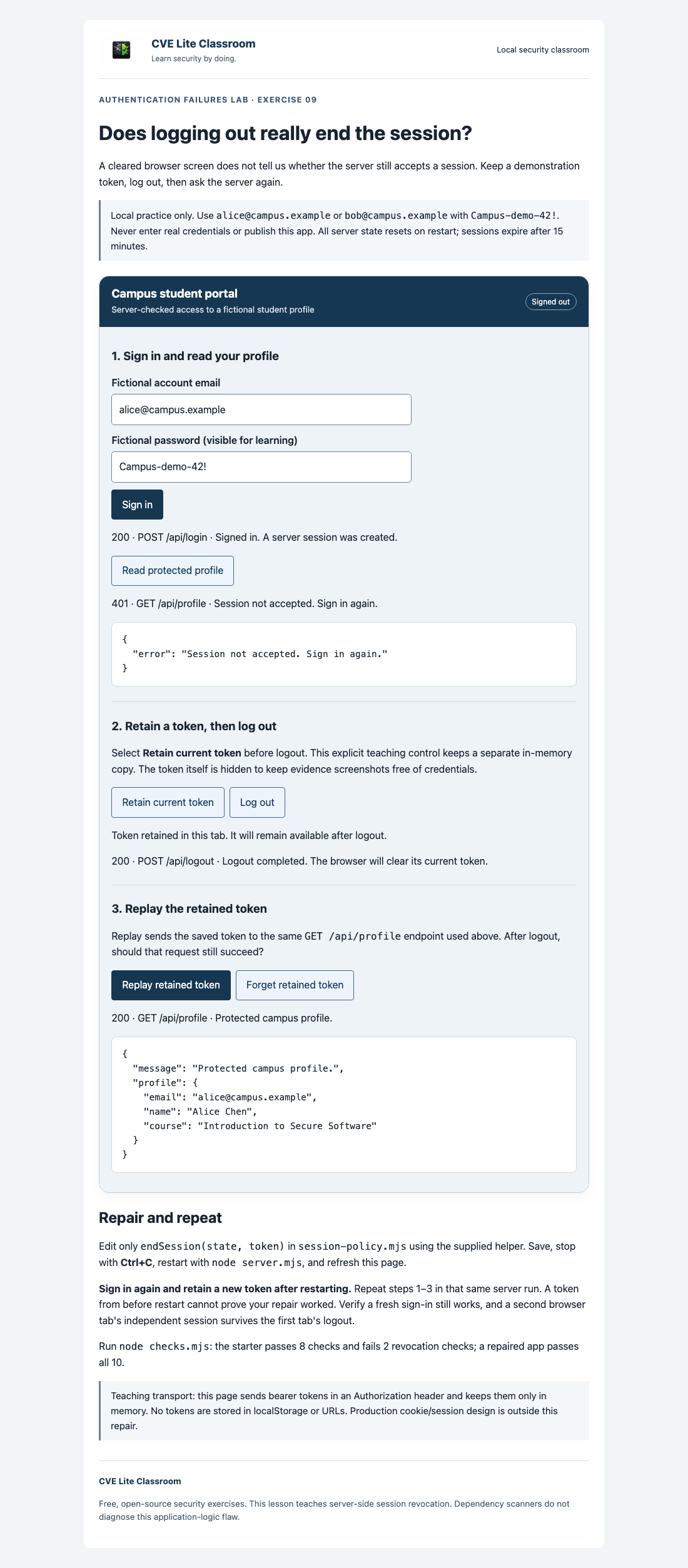
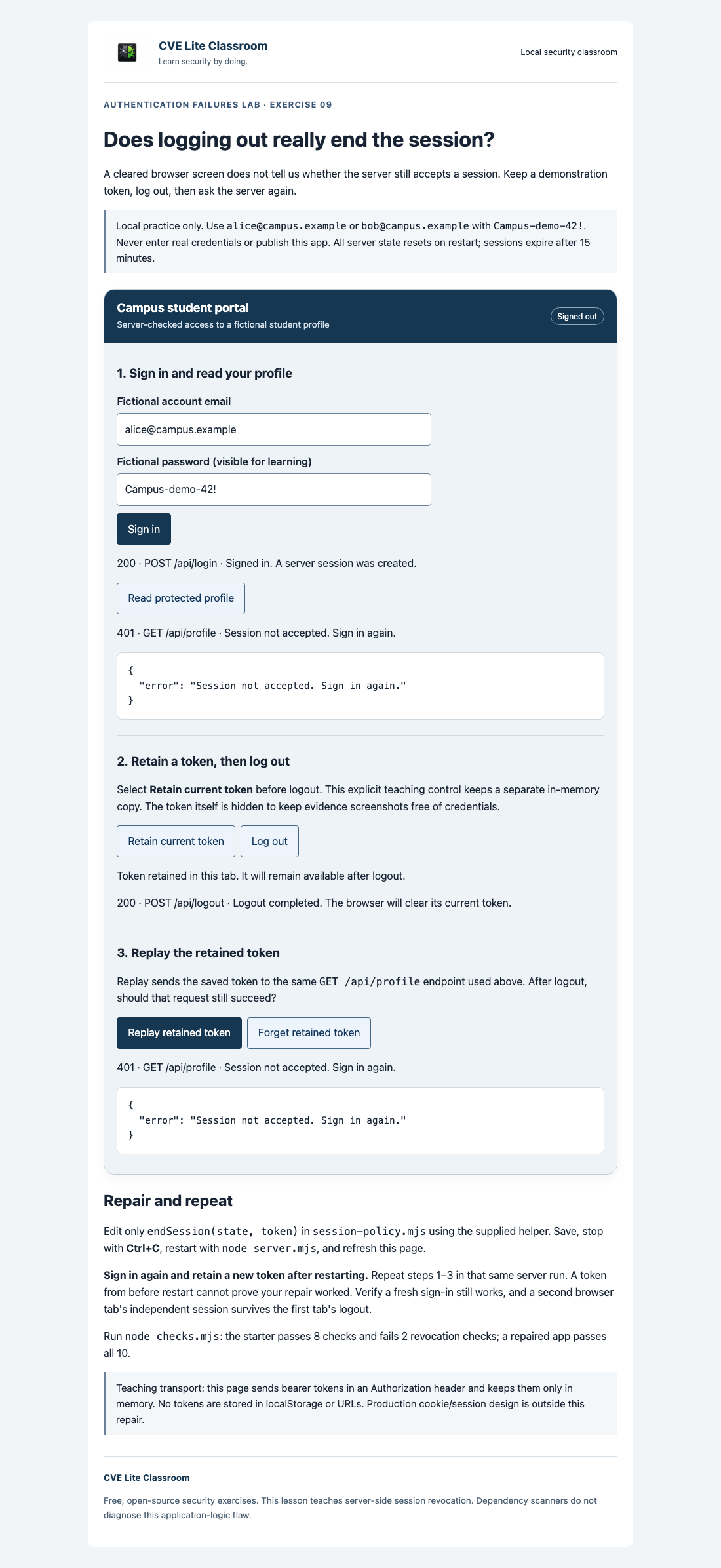
Original lesson screenshots. You’ll revisit these beside the relevant instructions.
Safety and scope
Use only the supplied fictional accounts and disposable tokens on http://127.0.0.1:3000. The starter intentionally fails to revoke sessions. Do not deploy it publicly, expose its port, use a tunnel, or connect it to real credentials or records.
The capture/replay panel is an explicit teaching aid for your own local session. Do not collect other people's tokens or test real systems. Keep token values out of submissions, logs and screenshots; record status codes and fictional profile results instead. The app keeps its tokens in browser memory and sends them only to its local server.
Stop the server with Ctrl+C when finished. Restarting clears server sessions; closing or refreshing a tab clears its browser state. This lab's published credentials, plain loopback HTTP, and in-memory bearer transport are teaching choices, not a production authentication recipe.
A successful check establishes the specific tested session behavior. It does not prove an application is secure in every situation. CVE Lite dependency scans do not detect this missing logout revocation.
What you will learn and verify
What you receive
A local portal with fictional Alice and Bob accounts, a retained-token replay panel, a one-function repair, a submission template, and ten checks. The starter passes eight and intentionally fails two logout-revocation checks. The repair passes all ten. The replay panel exposes only a token you explicitly capture for this local demonstration.
Learning boundary
This is one example of OWASP A07:2025 Authentication Failures: failure to invalidate sessions during logout. It is not a complete production authentication system. OWASP session-management guidance covers additional controls.
The browser holds a teaching bearer token in memory and sends it in an Authorization header. Normal access and replay use the same protected endpoint. Real tokens are credentials: do not expose them in screenshots or logs. Here, all tokens and accounts are disposable and local. The lesson does not implement production cookies, TLS, MFA, login throttling, or global sign-out. Logout affects the presented session only; expiry is a separate existing control.
CVE Lite CLI detects known dependency vulnerabilities in other lessons. It does not detect this application's missing server-side session revocation.
Exercise 09 worksheet: Does logging out really end the session?
Work only on the supplied local app with fictional accounts. Read safety. You need Node.js 22+, a desktop browser, and a text editor. No packages or previous lesson are required. Allow 75–90 minutes after setup. Record your work in the submission template.
Troubleshooting
- Address already in use: stop the other lesson server with Ctrl+C; only one can use port 3000.
- Page cannot connect: keep
node server.mjsrunning and use the exact loopback URL. - Change seems ineffective: save the correct
session-policy.mjs, restart that app's server, refresh, and repeat the full fresh-token sequence. - Replay is denied before repair: capture before logout and replay promptly; restart and expiry also invalidate tokens.
- Syntax error: compare the scaffold's braces, quotes, import path, and helper spelling; do not disable checks.
- Both tabs lose access: ensure you did not restart or clear all server sessions. Logout must target only its own token.
Lesson references
Return to examples, teaching notes or the worked solution when you need them.
Optional discussion
How would “log out all devices” change the policy? Why might an application revoke sessions after a password reset? How would a production framework manage secure cookies, TLS, expiration, and reauthentication? These are discussion extensions, not required changes or graded features here.
Screenshot sources and context
These are worked examples from the real local application, not evidence for a student's submission. Both were captured on 5 November 2026 with Chrome on macOS at a 1100-pixel desktop width using the maintainer browser smoke runner.
starting-point.png: unmodified student app after sign-in, protected profile, explicit token retention, logout, a normal profile request (401), and retained-token replay (200).expected-result.png: worked solution after the same fresh-token sequence, showing retained-token replay rejected (401).
The token is kept in memory and never displayed. All profiles and credentials are fictional. Each capture/logout/replay sequence runs within one server lifetime; neither restart nor expiry is used to produce rejection. A fresh login and protected profile were also verified after the screenshot. Separate HTTP regression tests verify that a concurrent independent session survives logout.
Reproduce from the repository root with Node.js 22+ and Chrome installed:
node tooling/authentication-browser-smoke.mjs
Set CHROME_PATH if Chrome is not in its standard macOS location. The runner writes desktop and mobile captures under dist/authentication-preview. This maintainer tool is not a student prerequisite. Students use their own local browser and submit actual results from their repaired app.
Worked solution — compare after your attempt
Worked reference: attempt the worksheet first, then compare your reasoning and results.
Exercise 09 worked solution
Compare after completing your own attempt. Only session-policy.mjs differs from the student application; the helper, server, page and checks are shared.
Repair
import { revokeSession } from './session-helpers.mjs';

export function endSession(state, token) {
  return revokeSession(state, token);
}
Removing the current token from the server's session store means the normal protected endpoint rejects every later copy of that token. The browser also clears its own current token. Other session tokens remain valid; a new login can create a fresh session.
Run and verify
From the repository root:
cd exercises/09-authentication-failures/solution
node checks.mjs
node server.mjs
Expect all 10 checks to pass, ending with 10 passed; 0 failed and exit code 0. Stop other lesson servers first and open http://127.0.0.1:3000. Log in as alice@campus.example / Campus-demo-42!, request the profile, capture the token, log out, and replay it: HTTP 401. Log in again and request the profile: HTTP 200. Two independently signed-in tabs remain independent when one logs out.
Do not restart between capture and replay. The restart required to load the code repair also clears the store, so capture a new token after it. These controls demonstrate one logout policy; they do not form a production authentication framework. Keep all use on loopback with fictional credentials.
For instructors
Use the teaching plan, walkthrough, 20-point rubric, and worked solution.
Export a student-only kit from the repository root, choosing a destination that does not exist:
node tooling/package-student-kit.mjs 09-authentication-failures node ./dist/session-logout
Distribute the entire output folder. It excludes instructor materials and the solution, which remains public in the repository. Local export does not require a published release; versioned download ZIPs are published separately.