Guided exercise
Software or Data Integrity Failures
Each step brings together the instructions, examples and evidence you need. Move freely using Next, Previous or the step list.
Before you start
The lesson at a glance
CVE Lite Classroom · Exercise catalog
A fictional campus announcement arrives with a matching checksum. Does that make it trustworthy? Change its message, recompute the checksum, and observe the starter accept it. Then repair one policy so that only updates signed by the trusted publisher can change the announcement.
Allow 75–90 minutes after setup. You need a desktop browser, a text editor, and Node.js 22 or newer. No prior exercise, package installation, account, or internet connection is needed after download. Updates are harmless JSON data; the app never executes them as code.
What the exercise looks like
Original lesson screenshots. You’ll revisit these beside the relevant instructions.
Safety and scope
Use only the supplied local application and fictional campus announcements on http://127.0.0.1:3000. The starter deliberately accepts untrusted updates with a recomputed checksum. Do not deploy it publicly, expose its port, use a tunnel, or connect it to real records or update systems.
Change only harmless announcement text in your local copy. Updates are JSON data and are never executed as code. Do not test someone else's software-update service or substitute real organizational announcements. Stop the server with Ctrl+C when finished.
The public verification key and teaching signatures are nonsecret. The publisher's private signing key is not included in the app or student kit; no learner needs to obtain, create, or share one. A key received with an untrusted update is not a trusted publisher key.
Passing the checks demonstrates this lesson's publisher-verification behavior. It does not establish freshness, prevent replay of genuine updates, protect against publisher compromise, or provide a production update system. CVE Lite dependency scans do not detect this missing application-level verification.
What you will learn and verify
What you receive
The local app includes genuine and tampered examples, an editable payload, a checksum calculator, inspection results, and twelve checks. The starter passes seven and intentionally fails five checks for publisher verification and state preservation; the repair passes all twelve. The worksheet explains hashes, signatures, exact bytes, and the publisher's public key before the one-function repair. Record your own evidence in the submission template.
The optional Signed Update Lab on the lesson website is a simulation using recorded results from the real starter and solution. It supports prediction and discussion; it does not run your edited code or replace local evidence.
Learning boundary
This is one example of OWASP A08:2025 Software or Data Integrity Failures: accepting an update without establishing that it came from a trusted publisher. The supplied helper uses Ed25519 through Node.js built-in cryptography. Students use that helper rather than implement cryptography.
The trusted public key is bundled with the application. A key supplied inside an update does not establish trust. A valid signature authenticates the exact signed bytes under that pinned key; it does not guarantee that content is wise, recent, or safe after the publisher's private key is compromised. Replaying a genuine update is permitted. Freshness, rollback protection, publisher compromise, key rotation, and production update delivery are outside this exercise.
CVE Lite CLI detects known dependency vulnerabilities in other lessons. It does not detect this application's missing publisher-signature verification.
Exercise 10 worksheet: Can you trust this update?
Work only on the supplied local app with fictional campus announcements. Read safety. You need Node.js 22+, a desktop browser, and a text editor. No packages or earlier lesson are required. Allow 75–90 minutes after setup. Record observations in the submission template.
Troubleshooting
- Address already in use: stop the other lesson server with Ctrl+C; only one can use port 3000.
- Page cannot connect: keep
node server.mjsrunning and use the exact loopback URL. - Repair seems ineffective: save the correct policy file, restart that folder's server, refresh, and repeat the genuine-then-rehashed sequence.
- Tampering rejected before recomputing: expected; recompute the checksum to expose the missing publisher check.
- Tampering rejected even after recomputing in the starter: check JSON syntax and keep the required title, message, and positive integer version. The starter still validates data shape.
- A genuine signature fails after formatting JSON: load the original genuine fixture again. Whitespace changes the signed bytes.
- Current announcement is unchanged after rejection: expected; rejection must preserve state. The payload editor shows a proposed update, not necessarily the current accepted announcement.
- Syntax error after editing: compare the scaffold's braces, import path, quotes, and helper spelling. Do not change the checks.
Lesson references
Return to examples, teaching notes or the worked solution when you need them.
Optional discussion
What additional policy would prevent applying an older genuine update? How would an application replace a compromised publisher key safely? Why can signed data still be misleading or harmful? Freshness, rollback protection, key rotation, and publisher compromise are discussion topics, not required implementations.
Screenshot sources and context
These worked examples show the local application with fictional campus announcements. They are not evidence for a student's submission. Students should capture their own results after editing and restarting their app.
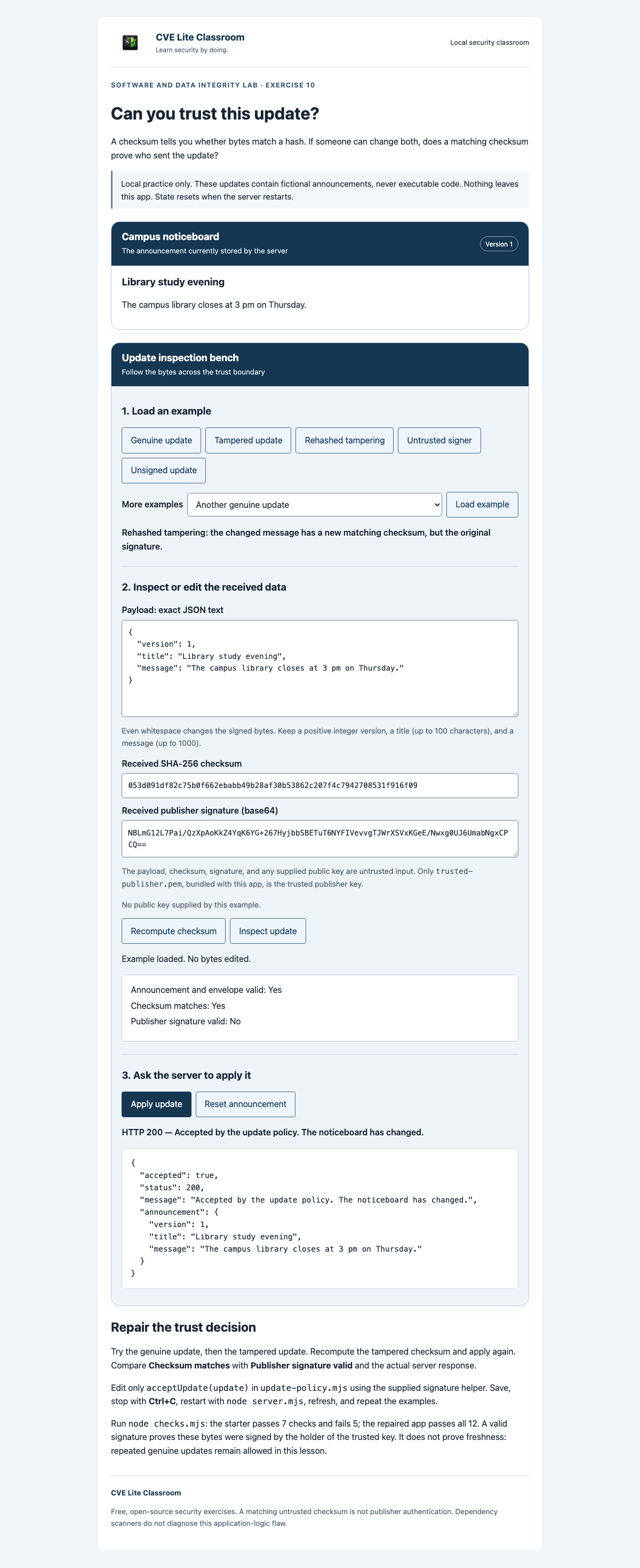
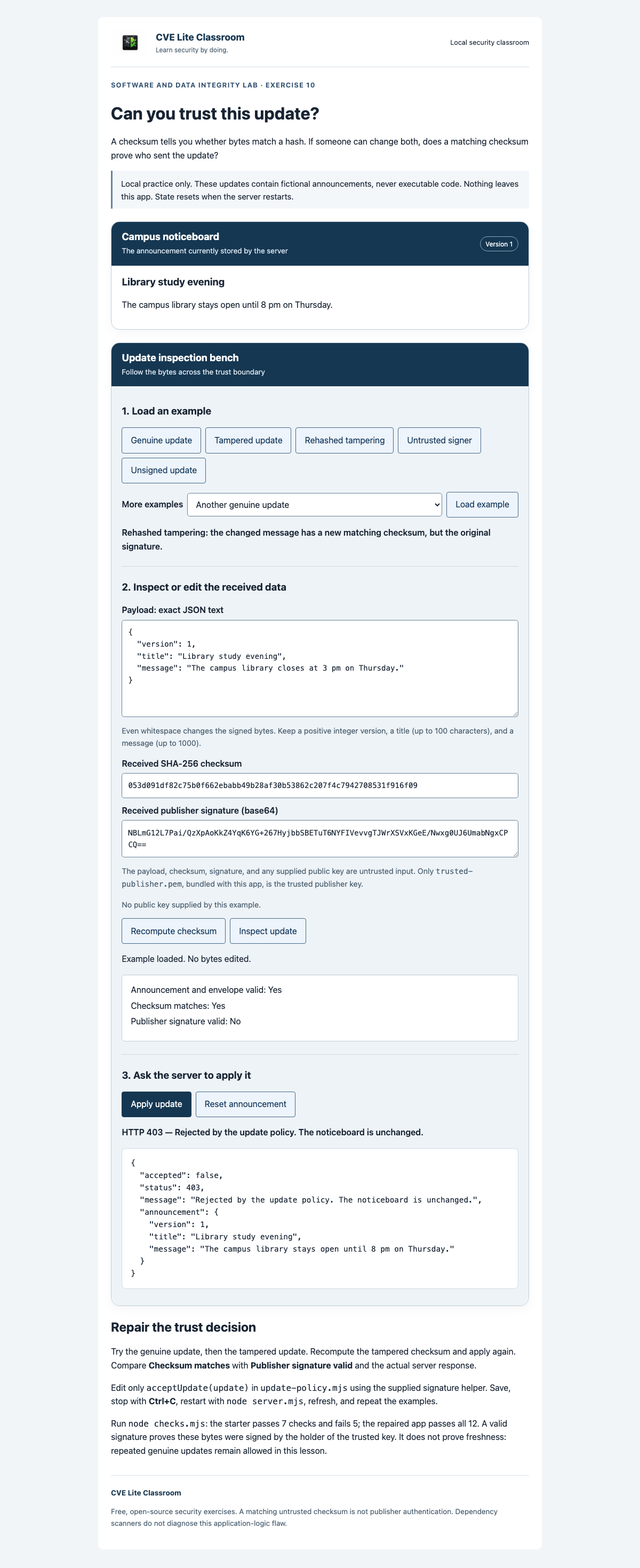
starting-point.png: the unmodified student application accepts a rehashed tampered announcement. The checksum matches but the trusted publisher signature is invalid.expected-result.png: the solution first accepts a genuine announcement, then rejects the rehashed tampered update. The current announcement remains the genuine one; no reset or restart occurs between acceptance and rejection.
The payload editor contains the proposed update. The current-announcement panel contains the last accepted update; comparing these panels makes the integrity boundary visible. The app handles harmless JSON data and does not execute update content. Public keys and teaching signatures are nonsecret; private signing keys are not shipped with the application.
Captured on 2026-11-16 from the actual student and solution HTTP applications in Chromium 151.0.7922.34 on macOS. Both captures use a 1200 × 900 browser viewport, device scale 1, and a full-page image. The capture loaded and applied Genuine update, then Rehashed tampering, without resetting or restarting between them. The starter returned HTTP 200; the solution returned HTTP 403. The solution's noticeboard text was checked to remain unchanged. Both apps were also checked at 390 px width without horizontal overflow or browser script errors.
Both images were refreshed after the student/professor review corrections on the same date. They show the updated starter check baseline (7 passed, 5 failed); the stronger preservation check now uses rehashed tampering. Response evidence is captured immediately after applying the displayed payload.
Worked solution — compare after your attempt
Worked reference: attempt the worksheet first, then compare your reasoning and results.
Exercise 10 worked solution
Compare after completing your own attempt. Only update-policy.mjs differs from the student application's code; the helper, public key, fixtures, service, page, and checks are shared.
Repair
import { verifyPublisherSignature } from './update-helpers.mjs';

export function acceptUpdate(update) {
  return verifyPublisherSignature(update);
}
The starter accepts a schema-valid payload if its computed SHA-256 checksum matches the checksum delivered alongside it. Someone who changes that payload can also calculate a matching checksum. The repaired policy instead requires a signature that verifies with the trusted publisher public key bundled with the app.
The supplied helper uses Node's built-in Ed25519 verification on the exact UTF-8 payload string. It does not trust a public key supplied by the envelope. It rejects missing, malformed, or invalid signatures safely. The surrounding service still validates the envelope and announcement before acceptance and preserves the previous announcement on rejection. No private signing key is shipped with either app or the student kit.
Run and verify
From the repository root:
cd exercises/10-software-data-integrity/solution
node checks.mjs
node server.mjs
Use Node.js 22+. Expect all 12 checks to pass, ending with 12 passed; 0 failed, exit code 0. The unchanged starter has 7 passed; 5 failed. Stop other lesson servers and open http://127.0.0.1:3000.
Click Genuine update, inspect it, and apply it: HTTP 200. Then click Rehashed tampering, inspect the matching checksum and invalid signature, and apply: HTTP 403. The current title, message, and version must remain the genuine values; do not reset or restart between these requests. Apply the second genuine update through More examples and Load example: HTTP 200. Applying that genuine example again remains valid.
The checks also cover an untrusted signer, unsigned updates, malformed signatures, malformed JSON, invalid announcement shape, and malformed envelopes. Genuine acceptance prevents an always-deny answer from passing. A second genuine update prevents treating a single known message as the publisher policy.
What the repair proves
A signature verified under the pinned key establishes authenticity of those payload bytes relative to that key. It does not establish whether the publisher's content is helpful, whether the update is newest, or whether the publisher's signing key remains uncompromised. Genuine replay and rollback are permitted here. Key rotation, freshness policy, and production update delivery require further design.
Keep use on loopback with fictional data. This is a focused example of OWASP A08:2025 Software or Data Integrity Failures; the implementation uses Node.js cryptography. CVE Lite dependency scans do not detect this application policy flaw.
For instructors
Use the teaching plan, walkthrough, 20-point rubric, and worked solution.
Export a student-only kit from the repository root, choosing a destination that does not exist:
node tooling/package-student-kit.mjs 10-software-data-integrity node ./dist/signed-updates
Distribute the entire output folder. It excludes the solution and instructor materials, which remain public in the repository. No private signing key is shipped with the app or kit. Local export does not require a published release; versioned download ZIPs are published separately.